
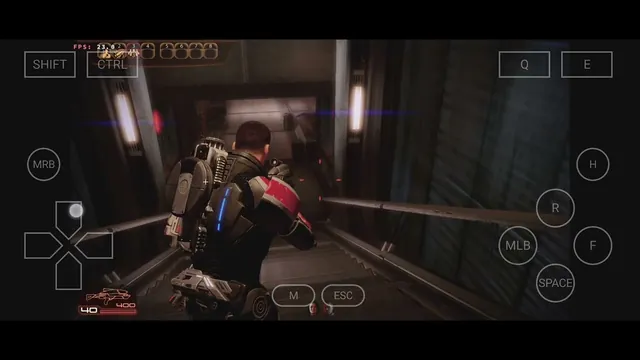
What Can It Run?
This is the fun part. A rough map of reality:
| How well it runs | Examples |
|---|---|
| Great - even on mid-range phones | Stardew Valley, Terraria, Hollow Knight, Cuphead, FTL, Slay the Spire, Vampire Survivors, Into the Breach, Diablo II, Age of Empires II |
| Playable - strong phone + some tuning | Skyrim, Fallout: New Vegas, GTA: San Andreas, Half-Life 2, Portal, Left 4 Dead 2, Torchlight II |
| Don't bother | Modern AAA games (Elden Ring, Cyberpunk), online games with anti-cheat (Valorant, Fortnite) |
People have even coaxed the PC version of Genshin Impact into running on flagship phones, which tells you how far this can stretch, even if that one is more party trick than daily driver.
More Than Games
Games are what really matter, but Winlator also provides other regular Windows programs. This can be useful for things like Notepad++, 7-Zip, IrfanView, and even older Office and Photoshop.
All the common Windows programs do have their Android counterparts, and thus the application side is not that important compared to the gaming side. But things get interesting when it comes to niche applications, something that your job relies on, and has no Android counterpart.
Also, with Winlator on a tablet using a Bluetooth keyboard and mouse, it really feels like running a small Windows PC.
What Your Phone Needs
| Requirement | Details |
|---|---|
| Android version | 9.0 or newer |
| Processor | 64-bit ARM (any modern phone) |
| RAM | 4 GB minimum; 8 GB or more for 3D games |
| GPU | Snapdragon (Adreno) chips work best; Mali GPUs work but struggle more |
| Storage | A few hundred MB free, plus room for your games |
| Root | Not needed, not used |
Snapdragon phones are the comfortable choice; Winlator's fastest graphics driver (called Turnip) is built for Adreno GPUs. Samsung Exynos and other Mali-based phones can run Winlator, with more patience and lower settings. Don't underestimate the RAM line; modern Android eats a lot of it, and 3D games through a translation layer need headroom.